> For the complete documentation index, see [llms.txt](https://docs.madrix.dev/llms.txt). Markdown versions of documentation pages are available by appending `.md` to page URLs; this page is available as [Markdown](https://docs.madrix.dev/documentation/project-settings.md).
# Project Settings
Here you configure your project's identity, access, and deployment.
For security, authentication, and policies of the running app, use [Runtime Settings](/documentation/runtime-settings.md).
### Basic Settings
You can adjust:
* **Project name (Display Name** per language**)**
* **Delete the project**
{% hint style="danger" %}
**Danger Zone: remove project**\
This action is irreversible.\
It removes project data, components, menus, and settings.
To confirm, type the **project name** and click **Confirm deletion**.
{% endhint %}
### Visual identity
Use to align the app with your brand.
Common settings:
* **Project icon**
* **Dark Mode**
* **Contrast**
* **Right to Left (RTL)**
* **Compact**
* **Layout**
* Left menu
* Top menu
* Collapsed left menu
* **Font**
* Font type
* Font size
* **Theme colors**
* Primary
* Secondary
* Info
* Success
* Warning
* Error
Finish with **Save** or discard with **Cancel**.
### Languages
Here you manage the languages enabled in the project.
You can:
* See the list of configured languages.
* Add a language.
* Remove a language.
### Project team
Use to share the project with other people on the platform.
Each member can have a different role (e.g., administrator).
### GitHub
Connect a repository to synchronize code and history.
Common fields:
* **Repository URL**
* **Branch**
* **Access Token**
* **Auto-sync enabled**
Typical flow:
1. Fill in URL, branch, and token.
2. Click **Test connection**.
3. Click **Connect**.
{% hint style="warning" %}
Use a token with the smallest possible scope.\
Avoid personal tokens shared between people.
{% endhint %}
### Version history
Here you see the project's version stack.
You can:
* Identify the **current version**.
* Run a specific version.
* Revert to a previous version.
{% hint style="warning" %}
Reverting can undo UI changes and rules.\
Test in Preview before publishing to production.
{% endhint %}
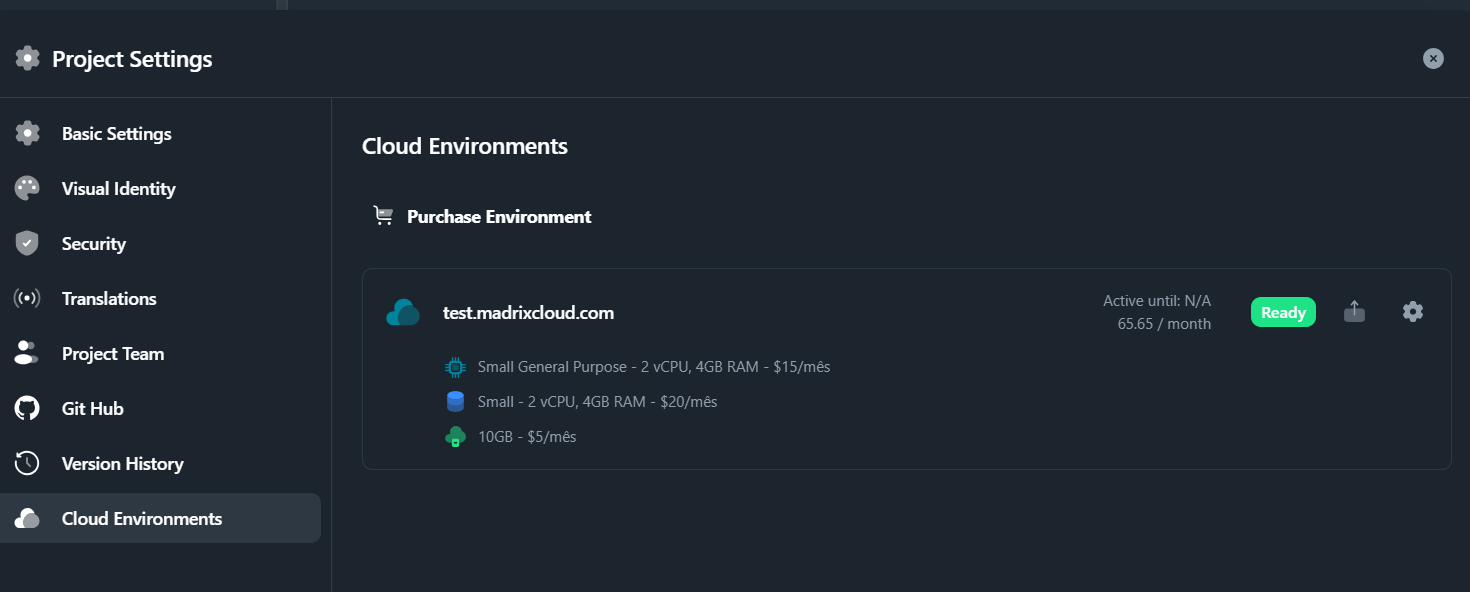
### Cloud environments
A Cloud environment is where your app is published.
Examples:
* `Dev` for quick tests.
* `Staging` for acceptance testing.
* `Prod` for end users.
#### Create and publish an environment (recommended flow)
{% stepper %}
{% step %}
### Create the environment
In the environments list, click **Add**.
Fill in:
* **Environment name**
* **External domain** (optional)
* **Application server**
* **Database server**
* **File storage**
Click **Proceed to payment** or **Cancel**.
{% endstep %}
{% step %}
### Payment (Stripe)
Payment is processed securely via Stripe.
When you proceed, you will see the checkout screen.
{% endstep %}
{% step %}
### Provisioning (Not Ready → Ready)
After payment, the environment remains **Not Ready** while provisioning.
Wait about **5 minutes**.
{% endstep %}
{% step %}
### Publish
When it is ready, the status changes to **Ready**.
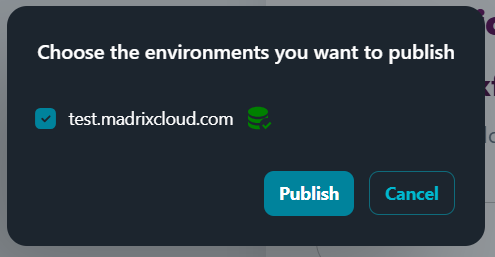
If you click **Publish** before that, the indicator turns red.

When the environment is ready, it appears in green.
Status ready to publish
Select the environment and click **Publish**.
{% endstep %}
{% step %}
### Wait and access
After publishing, wait about **3 minutes**.
Access the app via the environment URL.
In the list, it should appear as **Ready**.
Published environment
{% endstep %}
{% endstepper %}
#### Edit an environment
To change settings, click the environment's gear.
{% hint style="info" %}
Environments are provisioned on AWS with IaC, containers, load balancing, auto-scaling, and high availability Multi-AZ.
{% endhint %}
### Next steps
* Fine-tuning backend and scaffold: [Editor Mode](/documentation/editor-mode.md)
* Product overview: [Platform](/documentation/platform.md)
* Connections to your stack: [Integrations](/documentation/integrations-and-api.md)